
- Course
Creating a Meteor VFX Shot in After Effects
In this After Effects tutorial, you'll learn the process of how to create a VFX shot of a meteor. Software required: After Effects CS6, Trapcode Particular 2.13 and Knoll Light Factory 2.7.2.
Intermediate
- Course
Creating a Meteor VFX Shot in After Effects
In this After Effects tutorial, you'll learn the process of how to create a VFX shot of a meteor. Software required: After Effects CS6, Trapcode Particular 2.13 and Knoll Light Factory 2.7.2.
Intermediate
Get started today
Access this course and other top-rated tech content with one of our business plans.
Try this course for free
Access this course and other top-rated tech content with one of our individual plans.
This course is included in the libraries shown below:
- Core Tech
What you'll learn
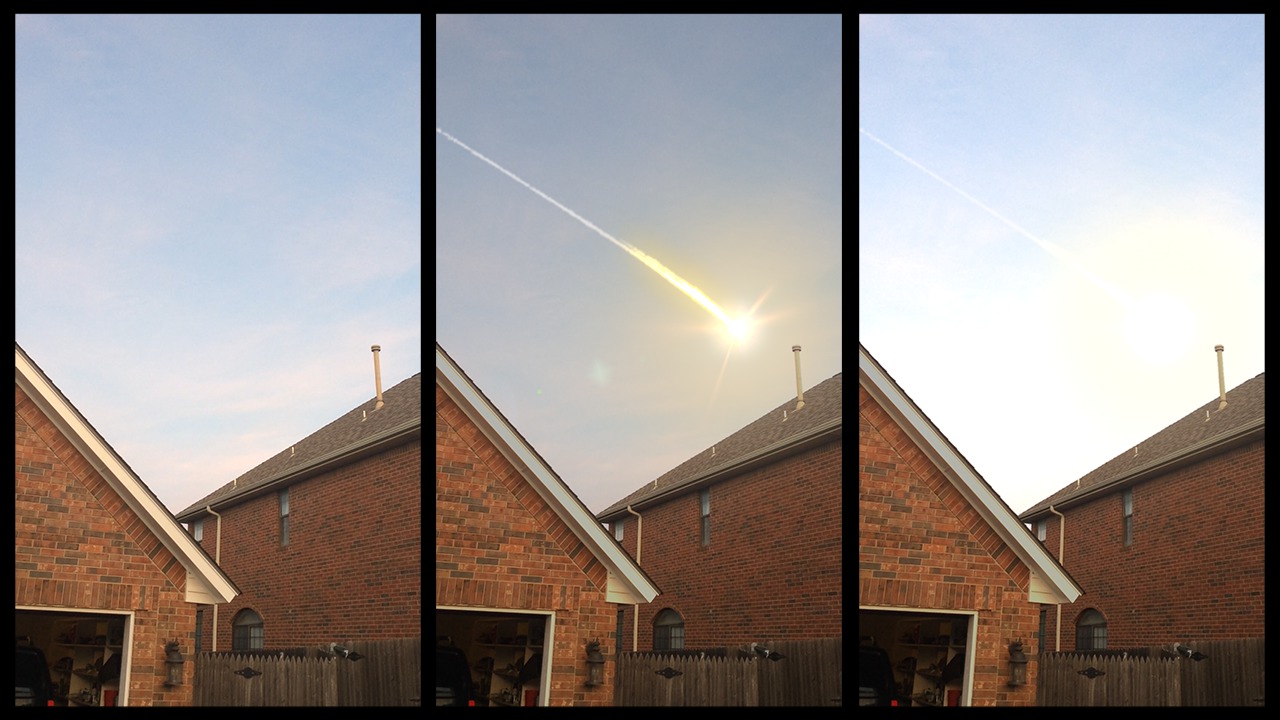
In this After Effects tutorial, you'll learn the process of how to create a VFX shot of a meteor. This specific shot was released outside of the Digital-Tutors name and accumulated over 500,000 views on YouTube, Reddit, and other media sites across the globe. The training is provided for free with a demo account or a free promotional course account. Utilizing plug-ins such as Trapcode's Particular and Knoll Light Factory, we'll go through the process of how a meteor effect can be created and integrated into video footage. We'll go through the process of creating an alpha matte, tracking our footage, creating a meteor effect with Particular and even work through a technique for converting 3D camera track into 2D data so it can be used with Knoll Light Factory. We'll also talk about how we can add in some lens effects and use animation to add polish to the shot. Once you've completed this After Effects training, you'll not only know how to achieve a meteor effect but you'll also understand how you can use these techniques to create your own meteor effect in your own footage. Software required: After Effects CS6, Trapcode Particular 2.13 and Knoll Light Factory 2.7.2.
Creating a Meteor VFX Shot in After Effects
Intermediate
Table of contents


Dan is an author at Pluralsight with a passion for helping others. Long before Dan ever officially donned his recording headset, he was a dedicated forum moderator with Digital-Tutors (now a Pluralsight company), helping out members with problems they encountered across a wide variety of software. Since then, he joined our team and continues to help others every day with their CG challenges.
