
- Course
Creating Phonemes for Character Animation in Illustrator
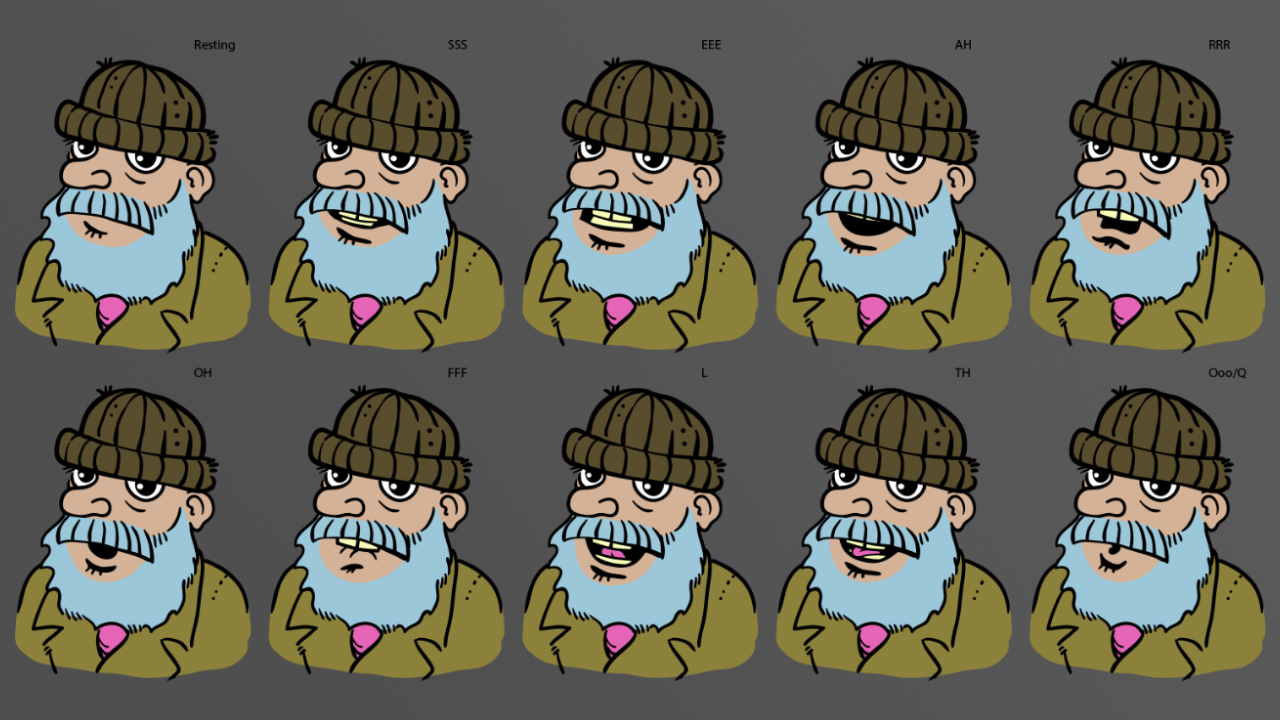
In this series of tutorials, we will be creating a mouth chart for a character in Illustrator. This chart will illustrate visemes for 10 different phonemes. Software required: Illustrator CC 2015.
Intermediate
- Course
Creating Phonemes for Character Animation in Illustrator
In this series of tutorials, we will be creating a mouth chart for a character in Illustrator. This chart will illustrate visemes for 10 different phonemes. Software required: Illustrator CC 2015.
Intermediate
Get started today
Access this course and other top-rated tech content with one of our business plans.
Try this course for free
Access this course and other top-rated tech content with one of our individual plans.
This course is included in the libraries shown below:
- Core Tech
What you'll learn
In this series of tutorials, we will be creating a mouth chart for a character in Illustrator. This chart will illustrate visemes for 10 different phonemes. We'll start by creating the resting position for our character. To help with this, we'll use different layers so it'll be easier to isolate areas of our character. This'll also save time when importing into animation software. Next we'll begin illustrating the other sounds in our mouth chart like EEE and AH. Once we've created illustrations for each phoneme, we'll create artboards for each sound. Our artboards will simplify the process of compositing our drawings into other software programs. After finishing this Illustrator tutorial, you'll know how to create phonemes for your own characters. Software required: Illustrator CC 2015.
Creating Phonemes for Character Animation in Illustrator
Intermediate
Table of contents
